Showing posts with label technology. Show all posts

Tuesday, November 18, 2014

Learning about Cyberbullying


In 6th grade we've had increasing reports of inappropriate behavior happening on cell phones and online after school.  In order to prevent cyberbullying and help students be aware of the dangers of cyberbullying, I found a great lesson on CommonSense Media called "Cyberbullying: Crossing the Line.  This lesson helped students learn to distinguish good-natured teasing from cyberbullying by analyzing online bullying behaviors that "cross the line," learning about the various ways that students can be cyberbullied and adopting the point of view of teens who have been cyberbullied and offer solutions.

We started by discussing,
  1. What are some of the ways that you and your friends tease each other online for fun?
  2. When does teasing "cross the line" and become harmful?
  3. What are some signs, and what does it feel like to be in that situation?
We then watched the video "Stacey's Story - When Rumors Escalate."  After the video I mixed up the students into small groups and had them discuss the following:
  • Why did the girls start to harass and threaten Stacey online in the first place?
  • When do you think the girls' behavior "crossed the line"?
  • Stacey says, "People talk really big, when there's like, miles between you." What do you think she means by this statement?
  • In what ways might the online context make the situation worse than if the bully had harassed Stacey offline?
  • Stacey's mom says that Stacey should call the school and report the incidents.  Stacey responds that it would "just make it worse." Do you think this is true?  Why or why not?
Afterward we shared our discussions with the group.  We expanded our discussion to how cyberbullying is different from bullying and what steps to take if something sent to us "crosses the line."


Finally we watched this informational video from stopbullying.gov:

Wednesday, April 2, 2014

Snapchat

I came across this informative article written by Monica Vila on Mashable.  She does an excellent job informing us adults to the ins and outs of Snapchat.  I plan on visiting TheOnlineMom more often to get up-to-date information about technology that children are using.


"Monica Vila is co-founder of TheOnlineMom, an organization that provides technology education to families and helps moms connect with brands they can trust.
And now for the self-destructing text … maybe.
 
Over the last few weeks there has been a lot of chatter about Snapchat, a very cool smartphone app that allows you to "chat" with friends via photos and now video. The idea is that you capture a "selfie" — or short video clip — using your phone’s front-facing camera, and then add a text caption or even a little artwork before sending it text-style to all your BFFs.

The popularity of the service was confirmed late last year when it was revealed that Snapchat had met the two accepted standards for success in today’s app-crazed world: regular server outages caused by too much traffic and an offer to acquire the service by Facebook. (Undeterred by the Snapchat founders’ refusal to sell, Facebook went ahead and launched its own Snapchat clone called Poke.) 

As well as offering the ability to add photos and videos to texts –- a huge hit amongst its target demographic of tweens and teens –- Snapchat has one other advantage: the messages self-delete after they have been viewed. That’s right: the sender can select a duration –- anything from 1 to 10 seconds –- after which the image, along with any added text or artwork, will self-destruct.

Should Parents Freak Out?

Of course, it didn’t take concerned parents too long to point out that such a service was perfect for "sexting" -– the unofficial practice of sending nude or sexually suggestive images via smartphones and other mobile devices. What better excuse for inappropriate behavior among oversexed teens, they argued, than a photo app that immediately destroys the evidence?
 
Unfortunately, kids who are determined to indulge in risky behavior hardly need Snapchat to achieve their goals. Ever since we started putting powerful digital cameras in immature hands, we have run the risk of our kids getting themselves into trouble. The safeguards haven’t changed: Talk to your kids so they understand the risks, and monitor their behavior so you can intervene before that risk becomes a serious problem.

Nothing Disappears From the Internet

And when you talk to your kids about Snapchat, Poke and similar messaging apps, you might want to point out that there is really no such thing as a self-deleting text. Snapchat recognizes just one of the ways in which its texts can live on by alerting the sender if the recipient takes a screenshot.

“What?” I hear you ask. “What’s the point of a self-deleting texting service if the person receiving the text can take a screenshot?” Exactly. Snapchat has no way to disable the recipient’s ability to take that screenshot, so all it can do is warn the sender when it happens. Add to that the ability of the recipient to use another smartphone or camera to capture a screenshot and that self-deleting feature doesn’t look quite so clever after all. 

Snapchat founder Evan Spiegel has been quoted as saying that the app was never intended for complete privacy — something that's borne out by a look at the company’s Terms of Service: “Although we attempt to delete image data as soon as possible after the message is transmitted, we cannot guarantee that the message contents will be deleted in every case.” Again, so much for self-delete.
 
Snapchat is a brilliant app that provides a novel and fun way for people to liven up those dreary texts. But let’s not kid ourselves –- or our kids –- that we’ve suddenly found a way to erase our digital footprints."

Monday, January 6, 2014

11 Social Media Tools Kids Use

I found this great article on CommonSense Media that keeps us all in the know with what aps children are currently using, why it's popular, and what adults need to know.

You don't need to know the ins and outs of every app and site that's "hot" right now (and frankly, if you did, they wouldn't be trendy anymore). But knowing the basics -- what they are, why they're popular, and the problems that can crop up when they're not used responsibly -- can make the difference between a positive and negative experience for your students.

11 Social Media Tools Parents and Teachers Need to Know About Now
Twitter Instagram Snapchat Tumblr Google+ Vine Wanelo Kik Messenger Ooovoo Pheed Ask.fm

1. Twitter is a microblogging site that allows users to post brief, 140-character messages -- called "tweets" -- and follow other users' activities.
Why it's popular
Teens like using it to share quick tidbits about their lives with friends. It's also great for keeping up with what's going on in the world -- breaking news, celebrity gossip, etc.

What parents and teachers need to know
  • Public tweets are the norm for teens. Though you can choose to keep your tweets private, most teens report having public accounts (Pew Internet & American Life Project, 2013). Talk to kids about what they post and how a post can spread far and fast.
  • Updates appear immediately. Even though you can remove tweets, your followers can still read what you wrote until it's gone. This can get kids in trouble if they say something in the heat of the moment.
  • It's a promotional tool for celebs. Twitter reels teens in with behind-the-scenes access to celebrities' lives, adding a whole new dimension to celebrity worship. You may want to point out how much marketing strategy goes into the tweets of those they admire.
(Back to top)

2. Instagram is a platform that lets users snap, edit, and share photos and 15-second videos -- either publicly or with a network of followers.
Why it's popular
Instagram unites the most popular features of social media sites: sharing, seeing, and commenting on photos. Instagram also lets you apply fun filters and effects to your photos, making them look high quality and artistic.

What parents need to know
  • Teens are on the lookout for "Likes." Similar to Facebook, teens may measure the "success" of their photos -- even their self-worth -- by the number of likes or comments they receive. Posting a photo or video can be problematic if teens post it to validate their popularity.
  • Public photos are the default. Photos and videos shared on Instagram are public and may have location information unless privacy settings are adjusted. Hashtags can make photos even more visible to communities beyond a teen's followers.
  • Mature content can slip in. The terms of service specify that users should be at least 13 years old and shouldn't post partially nude or sexually suggestive photos -- but they don't address violence, swear words, or drugs.
(Back to top)

3. Snapchat is a messaging app that lets users put a time limit on the pictures and videos they send before they disappear.
Why it's popular
Snapchat's creators intended the app's fleeting images to be a way for teens to share fun, light moments without the risk of having them go public. And that's what most teens use it for: sending goofy or embarrassing photos to one another. Snapchats also seem to send and load much "faster" than email or text.

What parents need to know
  • Many schools have yet to block it, which is one reason why teens like it so much (Pew Internet & American Life Project, 2013).
  • It's a myth that Snapchats go away forever. Data is data: Whenever an image is sent, it never truly goes away. (For example, the person on the receiving end can take a screenshot of the image before it disappears.) Snapchats can even be recovered.
  • It can make sexting seem OK. The seemingly risk-free messaging might encourage users to share pictures containing inappropriate content.
(Back to top)

4. Tumblr is like a cross between a blog and Twitter: It's a streaming scrapbook of text, photos, and/or videos and audio clips. Users create and follow short blogs, or "tumblelogs," that can be seen by anyone online (if made public).
Why it's popular
Many teens have tumblrs for personal use -- sharing photos, videos, musings, and things they find funny with their friends. Tumblelogs with funny memes and gifs often go viral online, as well (case in point: "Texts from Hillary").

What parents and teachers need to know
  • Porn is easy to find. This online hangout is hip and creative but sometimes raunchy. Pornographic images and videos, depictions of violence, self-harm, drug use, and offensive language are easily searchable.
  • Privacy can be guarded, but only through an awkward workaround. The first profile a member creates is public and viewable by anyone on the Internet. Members who desire full privacy have to create a second profile, which they're able to password protect.
  • Posts are often copied and shared. Reblogging on Tumblr is similar to re-tweeting: A post that's reblogged from one tumblelog then appears on another. Many teens like -- and in fact, want -- their posts reblogged. 
(Back to top)

5. Google+ is Google's social network, which is now open to teens. It has attempted to improve on Facebook's friend concept -- using "circles" that give users more control about what they share with whom.
Why it's popular
Teens aren't wild about Google+ yet. But many feel that their parents are more accepting of it because they associate it with schoolwork. One popular aspect of Google+ is the addition of real-time video chats in Hangouts (virtual gatherings with approved friends).

What parents and teachers need to know
  • Teens can limit who sees certain posts by using "circles." Friends, acquaintances, and the general public can all be placed in different circles. If you're friends with your kid on Google+, know that you may be in a different "circle" than their friends (and therefore seeing different information).
  • Google+ takes teens' safety seriously. Google+ created age-appropriate privacy default settings for any users whose registration information shows them to be teens. It also automatically reminds them about who may be seeing their posts (if they're posting on public or extended circles).
  • Data tracking and targeting are concerns. Google+ activity (what you post and search for and who you connect with) is shared across Google services including Gmail and YouTube. This information is used for targeting ads to the user. Users can't opt out of this type of sharing across Google services.
(Back to top)

6. Vine is a social media app that lets users post and watch looping six-second video clips. This Twitter-owned service has developed a unique community of people who post videos that are often creative and funny -- and sometimes thought-provoking.
Why it's popular
Videos run the gamut from stop-motion clips of puzzles doing and undoing themselves to six-second skits showing how a teen wakes up on a school day vs. a day during summer. Teens usually use Vine to create and share silly videos of themselves and/or their friends and family.

What parents and teachers need to know
  • It's full of inappropriate videos. In three minutes of random searching, we came across a clip full of full-frontal male nudity, a woman in a fishnet shirt with her breasts exposed, and people blowing marijuana smoke into each other's mouths. There's a lot of funny, clever expression on Vine, but much of it isn't appropriate for kids.
  • There are significant privacy concerns. The videos you post, the accounts you follow, and the comments you make on videos are all public by default. But you can adjust your settings to protect your posts; only followers will see them, and you have to approve new followers.
  • Parents or teachers can be star performers (without knowing). If your students film you being goofy or silly, you may want to talk about whether they plan to share it.
(Back to top)

7. Wanelo (Want, Need, Love) combines shopping, fashion blogging, and social networking all in one. It's very popular among teens, allowing them to discover, share, and buy products they like.
Why it's popular
Teens keep up with the latest styles by browsing Wanelo's "trending" feed, which aggregates the items that are most popular across the site. They can also cultivate their own style through the "My Feed" function, which displays content from the users, brands, and stores they follow.

What parents and teachers need to know
  • If you like it, you can buy it. Users can purchase almost anything they see on Wanelo by clicking through to products' original sites. As one user tweeted, "#Wanelo you can have all of my money! #obsessed."
  • Brand names are prominent. Upon registering, users are required to follow at least three "stores" (for example, Forever21 or Marc Jacobs) and at least three "people" (many are other everyday people in Wanelo's network, but there are also publications like Seventeen magazine).
  • There's plenty of mature clothing. You may not love what kids find and put on their wish lists. 
(Back to top)

8. Kik Messenger is an app-based alternative to standard texting that kids use for social networking. It's free to use but has lots of ads.
Why it's popular
It's fast and has no message limits, character limits, or fees if you just use the basic features, making it decidedly more fun in many ways than SMS texting.

What parents and teachers need to know
  • It's too easy to "copy all." Kik's ability to link to other Kik-enabled apps within itself is a way to drive "app adoption" (purchases) from its users for developers. The app also encourages new registrants to invite everyone in their phone's address book to join Kik, since users can only message those who also have the app.
  • There's some stranger danger. An app named OinkText, linked to Kik, allows communication with strangers who share their Kik usernames to find people to chat with. There's also a Kik community blog where users can submit photos of themselves and screenshots of messages (sometimes displaying users' full names) to contests.
  • It uses real names. Teens' usernames identify them on Kik, so they shouldn't use their full real name as their username.
(Back to top)

9. Oovoo is a free video, voice, and messaging app. Users can have group chats with up to 12 people for free. (The premium version removes ads from the service.)
Why it's popular
Teens mostly use Oovoo to hang out with friends. Many log on after school and keep it up while doing homework. Oovoo can be great for group studying and it makes it easy for kids to receive "face to face" homework help from classmates.

What parents and teachers need to know
  • You can only chat with approved friends. Users can only communicate with those on their approved "contact list," which can help ease safety concerns.
  • It can be distracting. Because the service makes video chatting so affordable and accessible, it can also be addicting. A conversation with kids about multitasking may be in order.
  • Kids still prefer in-person communication. Though apps like Oovoo make it easier than ever to video chat with friends, research shows that kids still value face-to-face conversations over online ones -- especially when it comes to sensitive topics. Still, they sometimes find it hard to log off when all of their friends are on.
(Back to top)

10. Pheed is best described as a hybrid of Facebook, Instagram, Twitter, and YouTube -- except that you can require others to pay a premium to access your personal channel.
Why it's popular
Pheed's multimedia "all in one" offering seems to be capturing teens' attention the most. Some teens also like the fact that they have more control over ownership and copyright, since Pheed allows its users to watermark their original content.

What parents and teachers need to know
  • It's hot! According to Forbes, Pheed has swiftly become the No. 1 free social app in the App Store, thanks in large part to teens. Time will tell whether artists and celebrities will jump on the bandwagon and start using Pheed to promote themselves and charge their fans to view what they post.
  • Users can make money. Users can charge others a subscription fee to access their content, ranging from $1.99 to $34.99 per view, or the same price range per month. Note that a cut of all proceeds goes to Pheed.
  • Privacy updates are in the works. Kids should be aware that their posts are currently public by default and therefore searchable online.
(Back to top)

11. Ask.fm is a social site that lets kids ask questions and answer those posted by other users -- sometimes anonymously. 
Why it's popular
Although there are some friendly interactions on Ask.fm -- Q&As about favorite foods or crushes, for example -- there are lots of mean comments and some creepy sexual posts. This iffy content is part of the site's appeal for teens. 

What parents and teachers need to know
(Back to top)

Tuesday, October 29, 2013

Children's Media Use in America 2013

CommonSense Media created this insightful infographic on our children's use of media in 2013:


Monday, October 28, 2013

Cyberbullying Prevention Tips

CommonSense Media is a national nonprofit organization dedicated to helping kids thrive in a digital world and tackle the issue of cyberbullying.  They have begun a new campaign, "Stand Up, Don't Stand By," that provides parents and educators with the tools and information they need to teach kids about the role they might play in cyberbullying, and how they can stop it.

Unfortunately, cyberbullying is an issue in schools everywhere.  At Lee Elementary, we believe it's best to address cyberbullying and the way our kids treat each other online proactively.  We know we have a responsibility to help our kids grow and thrive in this new media world.  Through my guidance lessons, I will be teaching and empowering our older students not only to stand up to cyberbullying, but also to practice safe, smart, and respectful digital behavior every day.

CommonSense Media has developed many resources to help parents and teachers with guiding children through safe online communication.  They have put together a helpful video for parents that includes tips for teaching your children how to communicate appropriately online.  Additionally, here are 2 informational fact sheets below.


Friday, May 17, 2013

Posting Online

In fifth grade we've began a new project to help raise awareness of cyber-safety.  I found a variety of great resources on www.netsmartz.org to help facilitate this.  We started by watching the video below, Miketosis.  In this video a crush is revealed during a science class and starts spreading quickly through the school by means of cell phones and computers.  Students text, email, share, and post this embarrassing information within seconds.


Afterward we discussed how the actions they take online can have offline consequences.  I asked them if they've, or someone they know, have ever posted something online that embarrassed them or got them into trouble.  How do they decide what information and images they post online?  What is okay to post and not okay to post?  Why do people post inappropriate messages and pictures online?  Who can see the things you text, email, and post?  Is there any way to guarantee privacy?  How might things that are shared affect your future?


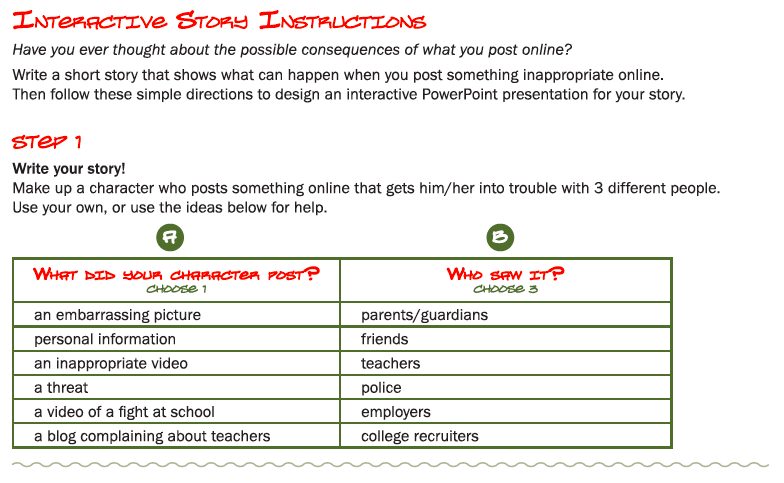
Then I introduced the project.  Students were asked to create a story where something is shared through technology and the consequences associated with it:


Monday, April 22, 2013

Instagram: What You Need to Know as a Parent

What is Instagram?

Instagram is "a fast, beautiful and fun way to share your photos with friends and family.  Snap a picture, choose a filter to transform its look and feel, then post to Instagram...it's photo sharing, reinvented." (Retrieved from http://www.instagram.com)

Here is a great post with pictures to explain how Instagram works from YourSphere for Parents.

What Parents Need to Know 

"Parents need to know that Instagram is a popular platform for instantly enhancing photos with cool effects and sharing them across a number of social media platforms.  The terms specify that users should be at least 13 years old and should not post partially nude or sexually suggestive photos but do not prohibit the portrayal of violence, swear words, or drugs.  Users can flag photos for review, but mature content still appears in some photos and in the comment sections.  Photos shared in Instagram are public and may have location information unless privacy settings are enabled." (Retrieved from http://www.commonsensemedia.org/mobile-app-reviews/instagram)

Parents also need to know the negative effects of children using Instagram unmonitored.  What started as a fun way to share photos with friends and family, has been corrupted by users with a more malicious intent.  As most parents do, they speak about appropriate photos to post, privacy settings, and only sharing with people you know.  However, this is simply not enough these days.  Here are some tips gathered from http://sociallyactive.com/instagram-and-kids-a-parents-guide.
  • You can browse through all photos posted by a user by going to Instagram.com/[USER NAME].  You should be monitoring your child's usage daily.
  • When you sign up for Instagram you get to create a user name.  Make sure your child is not using their real first and last names to create their accounts.
  • There is also an optional phone number section where users can submit their phone number as part of their public profile.  Do not allow your child to enter this personal information.
  • Online predators often create fake accounts to gain access to children's photos (such as family beach vacation photos).  Then they can share pictures posted on inappropriate message boards. 
  • When someone "follows" your child on Instagram, they have access to the user's profile information and photos.  This means they know your child's real first name, last name and possibly phone number when they registered for an account, in addition to a photo history of their daily activities.
  • Make sure the "Add to Photo Map" option is set to off.  This creates a map of where each photo was taken.  If your photos are already set to private, then no one (even followers) can see the map.  This is also referred to as "geo-tagging."
  • If your child doesn't know who the person is in real life, then they should not accept them as a follower.  Many children use the number of followers as a competition between other peers - this is not safe.
  • Discourage your child to post photos of themselves or friends.  If there aren't these photos posted, it increases their online safety. 
Blog Posts

Here are additional blog posts from parents and educators that give light to the negative activities that occur on Instagram everyday.  Thank you to an aware parent at our school for bringing these to my attention! :)

Friday, March 22, 2013

Cyberbullying Presentation

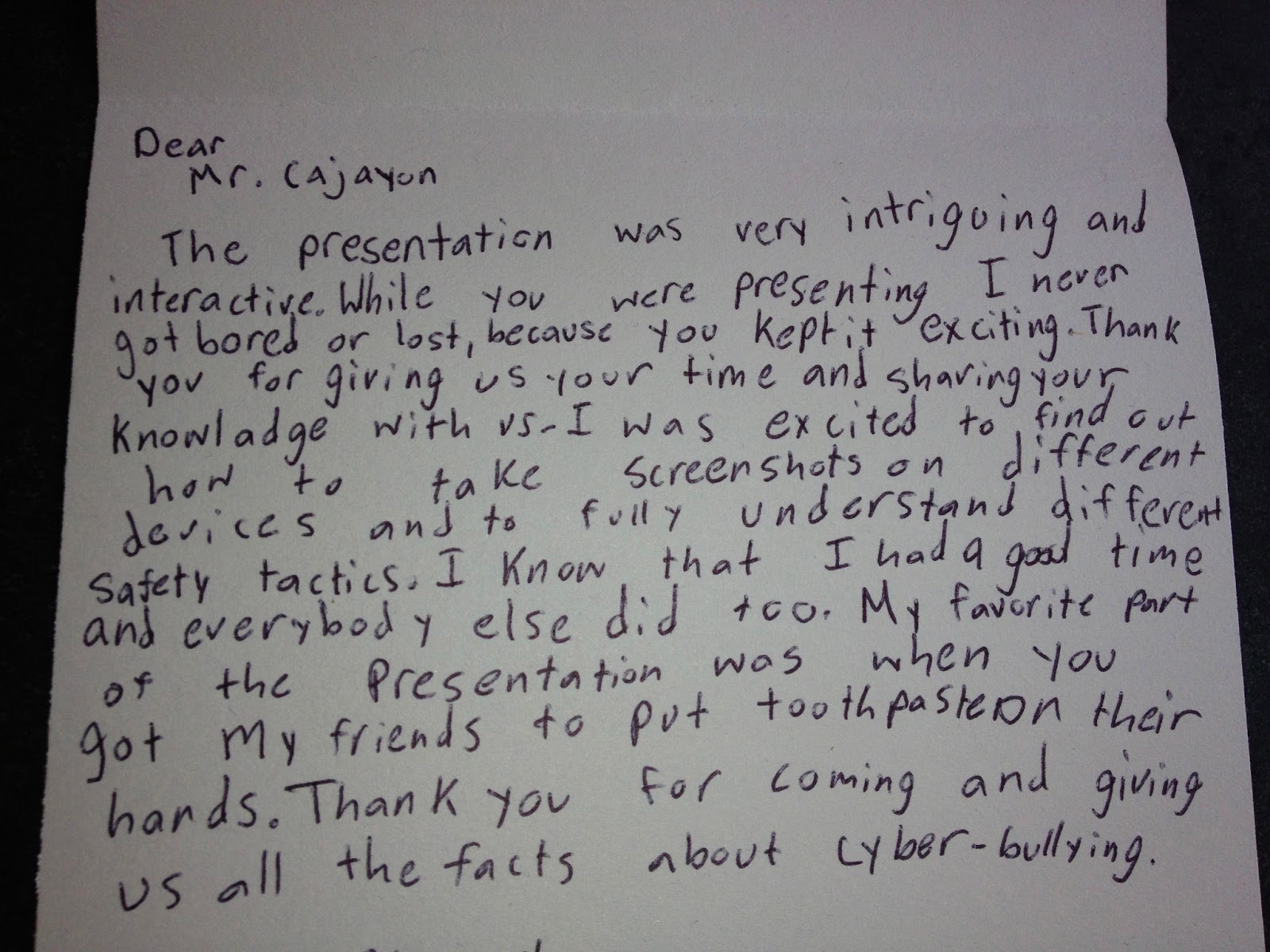
On March 22 we were lucky to invite an amazing speaker come talk to our 5th & 6th graders about cyberbullying.  Reggie Cajayon, School Safety Specialist from the Texas School Safety Center at Texas State University, brought to life an important safety message that continues to surface at schools across the country.  He presented a hands-on, engaging, and interactive way to educate students on what is cyberbullying (what it includes), the effects of cyberbullying (for both the victim and the bully), and steps to take if cyberbullied or know of cyberbullying (who to report to, etc.).  Students left feeling safe with what steps they need to take to prevent the threat of online predators and bullying.


Although Lee Elementary does not have a widespread issue, even one incident is one too many.  We are enlisting our families to help monitor online activities.


What to Monitor:

  • Online Gaming/Chatting: Game systems (Xbox, Playstation, Wii, etc)
  • Laptops & Social Websites
    • Grades K-2: Disney, Webkins, Poptropica etc
    • Grades 3-5 – Facebook, Gmail, Yahoo! Groups, MySpace, Twitter, Askme.fm
  • Cell Phones, iTouch, iPad ‘Apps’ (Instagram, etc)

How To Monitor:

  • Know the minimum user age recommendations for all sites
  • Read up on the American Academy of Pediatrics policy on media use:
  • Password protect all screens in house (TV, computer or internet devices, cell phones)
  • If children use technology, teach them to keep passwords secure and log-in where others can’t see or learn the password.
  • Know the safety measures to prevent access or bloc inappropriate content
  • Be cautious about your own social media habits.  Status updates, twittering details about daily activities, and “checking in” at locations leaves you vulnerable.  Children will want to do what you do when they get their own accounts.  Bullies and/or predators rely on posted information when they hunt for targets.
  • Maintain full parent access to all student use of email, phone and computer
  • Routinely log-in to see what persona your child projects when using technology
  • Talk about the short-term and long-term effects of what is posted online.

How to Intervene


  • If the privilege is being abused or is the source of too much distraction, remove the device or the power source.
  • Tell them to “Stop, Print & Tell” if they receive something that makes them uncomfortable
  • Contact social network providers to access the full range of options available to you to safeguard your child and his/her information.
  • If you have a concern off-campus, call Austin Police Department by dialing “3-1-1”, the non-emergency line.  Call “9-1-1” if you fear a threat or imminent harm is involved.

 What is Lee Elementary Doing?

  • Guidance lessons on building relationships, practicing social emotional skills, lessons on bullying, decision making, tattling vs. reporting, conflict resolution, and internet safety
  • “No Place For Hate” Campus – Promoted by the Anti-Defamation League to conduct annual building-wide activities that combat bullying, violence, including student-signed “Resolution of Respect”
  • 5th & 6th Grade Cyberbullying Presentation
  • Staff Training - Cyberbullying and bullying prevention, reporting incidents, prevention, internet safety

We all work hard to raise children who grow into caring, thoughtful adults.  They make mistakes in the process and hopefully learn along the way.  However, the permanence of words and images in cyberspace adds intensity and longevity to the consequences. 

For more information go to:

US Dept. of Health and Human Services: 

Center for disease Control: “Electronic Media and Youth Violence”:

Also check out my tab on Cyberbullying and Internet Safety with links to games, activities, and resources.
 
Thank you for your partnership in helping to keep all children safe.